Fuelling your Social Media body
 |
| Photo: law_keven. Remixed under Creative Commons. |

As a member of the Vancouver Board of Trade I've had the opportunity to meet many different and interesting business professionals. When I met @CoryFry of @ThinkCOS it was a great connection. His company offers health and wellness services to large organizations as part their benefits packages. He invited me to a few bootcamps where I got my lazy butt kicked.
After falling off that train and neglecting my need to exercise, I was later contacted by the Principal at Think COS to discuss how I could contribute to his organization by consulting around technology. I met with Antonio at a coffee shop near my office one sunny afternoon. Antonio's business acumen, his sheer desire to succeed and his genuine interest in improving the health and wellness of everyone were inspiring. I recognized him from somewhere but couldn't remember where.

I then realized that he was the trainer from the bootcamps. Not only does this guy work 12 hours a day on his business but he also runs the bootcamps to ensure that the exercise is quality and attendees are getting the most out of the experience. At the end of our talk he invited me to join him down at Kits beach Saturday mornings at 9am for a beach side bootcamp. It was that bond that began me on this road to a healthier lifestyle. Someone else was willing to go the extra mile for me and a complete stranger at that. I was floored and Saturday morning hurt but it's been great ever since.
I didn't think about how important what I am eating is to this experience until I was watching this documentary about the making of a hollywood film in Kansas by a father and son team. The movie starts at the exact moment that got me to thinking. Even those who are in the best shape need to be conscious of what they put into their bodies.
What one puts into the machine is so important to determining what one gets out of the machine. The same is true for social media, networking and business in general. What you get out of it is all about what you put in. So what are you putting in your social media machine? Human communications, promotional messages, marketing? Consider what is working in the space. Companies that are putting positive intentions, positive messaging and a true concern for customers into their social media machine are enjoying success on social media. See @Starbucks (big), @GranvilleMag (small).
 |
| Photo By: Amanda Slater. Remixed under Creative Commons. |
I then realized that he was the trainer from the bootcamps. Not only does this guy work 12 hours a day on his business but he also runs the bootcamps to ensure that the exercise is quality and attendees are getting the most out of the experience. At the end of our talk he invited me to join him down at Kits beach Saturday mornings at 9am for a beach side bootcamp. It was that bond that began me on this road to a healthier lifestyle. Someone else was willing to go the extra mile for me and a complete stranger at that. I was floored and Saturday morning hurt but it's been great ever since.
I didn't think about how important what I am eating is to this experience until I was watching this documentary about the making of a hollywood film in Kansas by a father and son team. The movie starts at the exact moment that got me to thinking. Even those who are in the best shape need to be conscious of what they put into their bodies.
 |
| By: Paul Kelpe. Remixed under Creative Commons. |
How Social Media startups are hurting my friends
 |
| Original By: bootload. Licensed under Creative Commons. |

Sadly, there already is a Facebook and a Digg and hundreds of other variations. Unless you have big backers and/or a niche market that is in serious need of it's own social network your idea is extremely unlikely to succeed. The sheer number of 'companies' launching as social networking or bookmarking sites is reaching into the tens of thousands. How many will be successful? Maybe none, maybe one. Now I know that your social network is better, faster, cooler and more versatile than Facebook but that doesn't mean people will use it. The trend that I have been noticing lately is that people don't want to login to another site to access yet another network they have to put time into the benefit; people are already spread to thin.

"Working at a startup is a valuable experience, and making mistakes earlier in your career will save you later on. Even if the social media startup fails miserably, you have learned valuable lessons that will make your future ventures more likely to succeed." -Anoop
Anoop is so right on that and don't get me wrong start-ups are a good things especially when planned properly, not just around an idea but around a business model where revenue is a real thing, not something that will come. How are start-up leaders going to pay their employees? That's the problem; often they don't. Young people like the idea of equity but equity in something worth nothing is worth, well, nothing. Whether it's for equity or as an intern these newly minted technology and programmer masterminds are often being used as 'slave' labour.
 |
| By: MotivatedPhotos.com |
If you are or know a talented young person drawn in by this new startup model be warned or warn those you know. Any startup without a marketing plan or an inkling of where revenue will come from should be avoided. Below is an image including a number of logos from recent startups in the technology space. The ones crossed with a pink X no longer exist and there are thousands more to come.

What are your feelings on this? Do you have personal experience? Any good experiences? Please share.
3 easy steps to make your Blogger blog a Website
 |
| By: Scott Beale Laughing Squid. Remixed under Creative Commons License. |
The 3 steps are explained in detail below but here they are if you are wondering what they are:
- Eliminate the Blogger Navbar
- Add a Favicon
- Use a custom URL
1. Eliminate the Blogger NavBar


Ok now open the find on page feature of your browser. Find this text string: "]]>" you should find two of them. On the line just before the first ]]> add this: "#navbar { display: none; }". It should look like this:
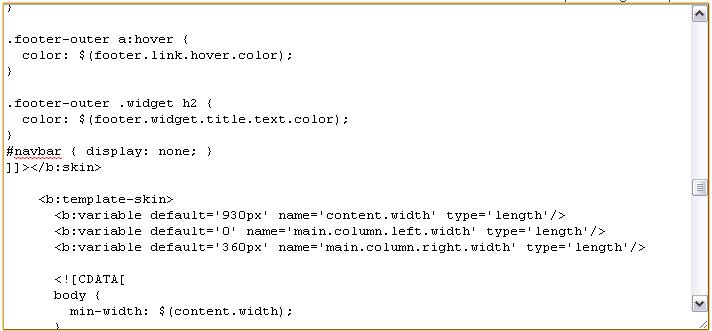
Now click "Save Template" at the bottom and Voila! The nav bar is gone!
2. Adding a Favicon
A favicon is a cool little thing. What is it? Check out your browser's address bar or the tab right now and you should see a little icon I made in Paint that is a red KE and a light blue background with an outline unless you are using Safari which sometimes mucks up favicons. On a tabbed browser these are seen on the tabs. Ever wonder how to get one? Wonder no longer.
First you need to decide on an image. It can be anything but remember it's going to be tiny (16 x 16 pixels) so make sure it is visible and means something. You can use Paint, Photoshop or Gimp to create an image that is 16 x 16. In some instructions that's all you have to do but sometimes the image needs to be converted to a format called ".ico".
To do that simply download Imagicon for PC or Favicon Generator for Mac both are free software. Open your image in this program and save it as a 16x16 .ico file. Now that you have your favicon it's time to get it uploaded and in use.
To upload the photo simply open up a new blog post or any post and click the "insert image" button and upload the image. Once the image is uploaded you can delete it from the post as it is now in your Picasa web album that's associated with your blog. Now click the "Insert Image" button again. This time click "From Picasa Web Albums" the image you uploaded should appear right there. Right click it and copy image URL.
Copy the text below this and replace 'IMAGE URL' with the URL of your image from above.
<link href="IMAGE URL" rel="shortcut icon" type="image/vnd.microsoft.icon/"/>
Take this finished snippet of text which should now look something like this:
<link href="https://blogger.googleusercontent.com/img/b/R29vZ2xl/AVvXsEiDGs0nqYZjqc-ZvwEj4KlAnznCQnETJvAwDX80cqqBmBJuOPUCxTn0VIfCx-BXGM8Dca2XcaT_ufKhQHvHDCeyWs0KbHqZDJ5hZAj59Ta1ID_1Qn5vQkGZ_oxgbaMHlAIdTB12hvh7LQ2R/s104/muffinman.PNG" rel="shortcut icon" type="image/vnd.microsoft.icon/"/>
Now open up the HTML of your blog again and expand the templates widgets by making sure the box is checked. This time use the Find on page feature to find: "/head". Now just before this place your snippet of text as above. Now save the template and Voila! Your blog has a favicon!
3. Use a custom URL
The last and most important thing for your website is that it has it's own URL or web address like kempedmonds.com. This part if super easy but cost $10/year. Go into blogger and go to the "Settings" tab then the "Publishing" tab then click on "Custom Domain". This will take you through the process of registering your custom domain. Make sure to forward your naked domain (kempedmonds.com) to your full domain (www.kempedmonds.com) to ensure that people get to your site as Blogger won't show your content on a naked domain (kempedmonds.com)
 That's it! It's quite simple to setup a blogger blog in the same fashion as a website especially now with Blogger's addition of the pages feature which can give you custom tabs/pages within your site. Remember to link back and tell your friends about this tool as it makes managing a simple site a lot easier and a lot cheaper.
Drop me a line with questions about how this works or you are having trouble kempedmonds at gmail.com
To upload the photo simply open up a new blog post or any post and click the "insert image" button and upload the image. Once the image is uploaded you can delete it from the post as it is now in your Picasa web album that's associated with your blog. Now click the "Insert Image" button again. This time click "From Picasa Web Albums" the image you uploaded should appear right there. Right click it and copy image URL.
Copy the text below this and replace 'IMAGE URL' with the URL of your image from above.
<link href="IMAGE URL" rel="shortcut icon" type="image/vnd.microsoft.icon/"/>
Take this finished snippet of text which should now look something like this:
<link href="https://blogger.googleusercontent.com/img/b/R29vZ2xl/AVvXsEiDGs0nqYZjqc-ZvwEj4KlAnznCQnETJvAwDX80cqqBmBJuOPUCxTn0VIfCx-BXGM8Dca2XcaT_ufKhQHvHDCeyWs0KbHqZDJ5hZAj59Ta1ID_1Qn5vQkGZ_oxgbaMHlAIdTB12hvh7LQ2R/s104/muffinman.PNG" rel="shortcut icon" type="image/vnd.microsoft.icon/"/>
Now open up the HTML of your blog again and expand the templates widgets by making sure the box is checked. This time use the Find on page feature to find: "/head". Now just before this place your snippet of text as above. Now save the template and Voila! Your blog has a favicon!
3. Use a custom URL
The last and most important thing for your website is that it has it's own URL or web address like kempedmonds.com. This part if super easy but cost $10/year. Go into blogger and go to the "Settings" tab then the "Publishing" tab then click on "Custom Domain". This will take you through the process of registering your custom domain. Make sure to forward your naked domain (kempedmonds.com) to your full domain (www.kempedmonds.com) to ensure that people get to your site as Blogger won't show your content on a naked domain (kempedmonds.com)

Drop me a line with questions about how this works or you are having trouble kempedmonds at gmail.com
Subscribe to:
Posts (Atom)


